Azure Architecture Review

Azure Architecture Review

Review the Azure services, subscriptions, and applications that matter against the Microsoft Well-Architected Framework. Start with real Azure evidence, find where risk is concentrated, and leave the team with decisions they can act on.

Well-Architected pillars Azure evidence Read-only access Review report

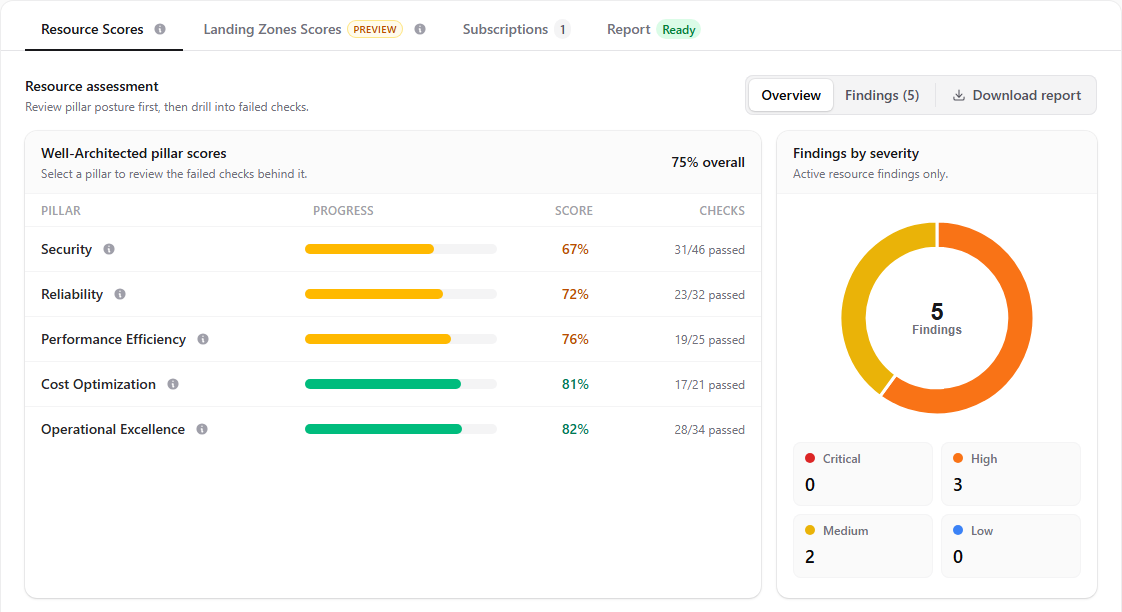
Architecture review scorecard

Ready
Hygiara Azure architecture review scorecard with Well-Architected pillar scores and findings.

Review Focus

Set the review scope before you score it

Question to answer

Across the Azure estate in scope, what would hurt the business most: outage, data loss, security exposure, slow recovery, poor visibility, or unnecessary cost?

Evidence
Start with subscriptions, resource groups, critical services, dependencies, regions, recovery targets, backup and restore evidence, public access, identities, secrets, diagnostics, alerts, scaling settings, and cost ownership.
Decision
Record the risk in plain English, name the affected resources, choose the Well-Architected pillar it belongs to, and decide whether to fix, accept, investigate, or redesign.

What is an Azure architecture review?

It is a review of how Azure is actually being used, backed by evidence from the subscriptions and resources in scope.

Hygiara can collect a broad view of the estate, but the value comes from turning that evidence into architecture findings: which services matter, where risk is concentrated, and which decisions need an owner.

The output should not be a raw inventory. It should explain what is affected, what the evidence shows, why it matters, who owns the decision, and what happens next.

What good looks like

Good findings are specific enough for an engineer to verify and clear enough for a stakeholder to prioritise.

“Storage risk” is not useful. “Production storage account allows public blob access and has no private endpoint” is useful because the team can prove it, discuss it, and fix or accept it.

A good review also records trade-offs. Higher cost for resilience may be the right call. A temporary public endpoint may be acceptable during a migration. What matters is that the decision is visible and owned.

Microsoft Well-Architected scope

Microsoft’s Well-Architected Framework reviews workload design across Reliability, Security, Cost Optimization, Operational Excellence, and Performance Efficiency.

Use those pillars to organise architecture findings, but do not force every observation into the report. If a landing zone or governance issue affects the services in scope, include the impact. If the issue is mainly about the shared platform foundation, keep it for the landing zone review.

Reviewer Notes

  1. 01

    Scope

    Write down the subscriptions, environments, applications, critical services, owners, regions, dependencies, and exclusions before reviewing controls.

  2. 02

    Evidence

    Every finding should point to a resource, setting, query result, missing signal, or stated limitation. If you cannot see backup state, RBAC, diagnostics, or cost data, say so.

  3. 03

    Decision

    Phrase the finding so the next meeting can decide: fix it, accept the risk, investigate impact, or redesign the affected service, pattern, or platform dependency.

Review Checks

What to check in Azure

Use the checks as a review path, not a raw inventory. Start with the checks most likely to affect architecture risk, then open each item to see the evidence to collect, the failure pattern to look for, and the decision the review should produce.

How to read this section

Collect the Azure evidence first.

Compare it with the expected operating model.

Decide whether to fix, accept, investigate, or redesign.

Primary review path

Open a check when you need the evidence and decision criteria.

8 of 16 checks shown first

01 Reliability design reviewed Check whether critical services have redundancy, failover, backup, and restore evidence aligned to business impact. High +
Collect
Critical service list, dependency map, availability targets, redundancy settings, failover design, backup posture, and documented recovery assumptions.
Look For
A critical service depends on single-instance resources, untested restore paths, or undocumented manual recovery steps.
Decide
Decide whether the service needs zone redundancy, regional recovery, stronger backup controls, or a documented accepted risk.

Query Examples

Use these only as a starting point for evidence collection.

1 example

Find reliability posture gaps on stateful resources

Reliability review needs evidence that stateful services can survive failure and be restored within business expectations.

ARG

This proves

Which stateful resources exist, where they run, and whether basic zone or redundancy signals are visible.

It does not prove

Whether failover is tested, RTO/RPO is acceptable, dependencies are redundant, or backups can be restored.

Hygiara adds

Hygiara links reliability evidence to WAF findings so reviewers can explain resilience risk instead of just listing deployed services.

Resources
| where type in~ (
  'microsoft.compute/virtualmachines',
  'microsoft.sql/servers/databases',
  'microsoft.dbforpostgresql/flexibleservers',
  'microsoft.storage/storageaccounts'
)
| extend zones = tostring(zones)
| extend redundancy = tostring(sku.name)
| project subscriptionId, resourceGroup, type, name, location, zones, redundancy, id
| order by subscriptionId, type, name

How to read it

Use this as the starting point for resilience questions: what fails with the resource, how is state recovered, and what dependency still creates a single point of failure?

02 Zone and region strategy validated Review availability zone use, regional dependencies, paired-region assumptions, and recovery architecture. High +
Collect
Resource locations, availability zone settings, paired-region assumptions, replication settings, traffic routing, and regional dependency inventory.
Look For
Resources are deployed in regions or zones that do not match the stated resilience model or introduce hidden single-region dependencies.
Decide
Confirm the required recovery level and flag unsupported assumptions before the architecture is scored as reliable.

Query Examples

Use these only as a starting point for evidence collection.

1 example

Find reliability posture gaps on stateful resources

Reliability review needs evidence that stateful services can survive failure and be restored within business expectations.

ARG

This proves

Which stateful resources exist, where they run, and whether basic zone or redundancy signals are visible.

It does not prove

Whether failover is tested, RTO/RPO is acceptable, dependencies are redundant, or backups can be restored.

Hygiara adds

Hygiara links reliability evidence to WAF findings so reviewers can explain resilience risk instead of just listing deployed services.

Resources
| where type in~ (
  'microsoft.compute/virtualmachines',
  'microsoft.sql/servers/databases',
  'microsoft.dbforpostgresql/flexibleservers',
  'microsoft.storage/storageaccounts'
)
| extend zones = tostring(zones)
| extend redundancy = tostring(sku.name)
| project subscriptionId, resourceGroup, type, name, location, zones, redundancy, id
| order by subscriptionId, type, name

How to read it

Use this as the starting point for resilience questions: what fails with the resource, how is state recovered, and what dependency still creates a single point of failure?

03 Backup and restore posture checked Confirm stateful services have protected backups, retention, vault protection, and a tested restore path. High +
Collect
Recovery Services vaults, backup policies, protected items, retention settings, restore test evidence, soft delete, immutability, and critical data stores.
Look For
Protected resources lack tested restore evidence, retention does not match the recovery requirement, or vault settings leave backups vulnerable.
Decide
Separate missing backup, weak retention, weak vault protection, and missing restore testing into clear remediation actions.

Query Examples

Use these only as a starting point for evidence collection.

1 example

Find reliability posture gaps on stateful resources

Reliability review needs evidence that stateful services can survive failure and be restored within business expectations.

ARG

This proves

Which stateful resources exist, where they run, and whether basic zone or redundancy signals are visible.

It does not prove

Whether failover is tested, RTO/RPO is acceptable, dependencies are redundant, or backups can be restored.

Hygiara adds

Hygiara links reliability evidence to WAF findings so reviewers can explain resilience risk instead of just listing deployed services.

Resources
| where type in~ (
  'microsoft.compute/virtualmachines',
  'microsoft.sql/servers/databases',
  'microsoft.dbforpostgresql/flexibleservers',
  'microsoft.storage/storageaccounts'
)
| extend zones = tostring(zones)
| extend redundancy = tostring(sku.name)
| project subscriptionId, resourceGroup, type, name, location, zones, redundancy, id
| order by subscriptionId, type, name

How to read it

Use this as the starting point for resilience questions: what fails with the resource, how is state recovered, and what dependency still creates a single point of failure?

04 Monitoring and diagnostics coverage checked Confirm critical services emit logs, metrics, alerts, and activity evidence to the right operational destination. Medium +
Collect
Diagnostic settings, Log Analytics workspaces, metrics, alert rules, activity log export, and service-specific operational logs.
Look For
Critical services can fail or change without producing enough telemetry for investigation, escalation, or service ownership.
Decide
Decide whether to remediate diagnostics centrally, add service-level signals, or document an alternate evidence source.

Query Examples

Use these only as a starting point for evidence collection.

1 example

Check diagnostic settings on critical resource types

Look for critical services that have no diagnostic setting resource attached. Missing diagnostics usually means weak incident evidence.

ARG

This proves

Which critical services appear to lack a directly attached diagnostic setting.

It does not prove

Whether logging is handled through a non-standard deployment pattern, inherited tooling, or another evidence source.

Hygiara adds

Hygiara turns diagnostic gaps into review findings with affected resource scope, service type, and operational impact.

let critical = Resources
| where type in~ (
  'microsoft.keyvault/vaults',
  'microsoft.storage/storageaccounts',
  'microsoft.sql/servers',
  'microsoft.network/applicationgateways',
  'microsoft.containerservice/managedclusters'
)
| project resourceId = tolower(id), subscriptionId, resourceGroup, type, name;
let diagnostics = Resources
| where type =~ 'microsoft.insights/diagnosticsettings'
| extend targetId = tolower(tostring(properties.scope))
| project targetId;
critical
| join kind=leftanti diagnostics on $left.resourceId == $right.targetId
| order by subscriptionId, type, name

How to read it

Treat this as a triage list. Some services may send logs through another pattern, but every critical production service should have an explainable audit trail.

05 Incident response signals reviewed Review action groups, alert rules, service health alerts, ownership, escalation paths, and noisy or missing signals. Medium +
Collect
Action groups, alert rules, service health alerts, escalation targets, notification channels, alert volume, and ownership metadata.
Look For
Alerts exist but are noisy, unactionable, missing for critical paths, or routed to people who do not own the service.
Decide
Map alerts to accountable owners and required response paths before treating operational excellence as healthy.

Query Examples

Use these only as a starting point for evidence collection.

1 example

Check diagnostic settings on critical resource types

Look for critical services that have no diagnostic setting resource attached. Missing diagnostics usually means weak incident evidence.

ARG

This proves

Which critical services appear to lack a directly attached diagnostic setting.

It does not prove

Whether logging is handled through a non-standard deployment pattern, inherited tooling, or another evidence source.

Hygiara adds

Hygiara turns diagnostic gaps into review findings with affected resource scope, service type, and operational impact.

let critical = Resources
| where type in~ (
  'microsoft.keyvault/vaults',
  'microsoft.storage/storageaccounts',
  'microsoft.sql/servers',
  'microsoft.network/applicationgateways',
  'microsoft.containerservice/managedclusters'
)
| project resourceId = tolower(id), subscriptionId, resourceGroup, type, name;
let diagnostics = Resources
| where type =~ 'microsoft.insights/diagnosticsettings'
| extend targetId = tolower(tostring(properties.scope))
| project targetId;
critical
| join kind=leftanti diagnostics on $left.resourceId == $right.targetId
| order by subscriptionId, type, name

How to read it

Treat this as a triage list. Some services may send logs through another pattern, but every critical production service should have an explainable audit trail.

06 Public exposure and ingress reviewed Identify public IPs, internet-facing endpoints, broad ingress rules, and missing edge controls. High +
Collect
Public IPs, load balancers, application gateways, App Service access, storage and Key Vault public access settings, and NSG ingress.
Look For
Public exposure exists without owner, purpose, protection pattern, expiry, or compensating controls.
Decide
Classify each exposure as intentional, protected, temporary, or unmanaged drift, then prioritize internet-facing production paths.

Query Examples

Use these only as a starting point for evidence collection.

1 example

Find public endpoints that need an architecture decision

Start with public IPs and public-facing PaaS configuration, then decide whether each exposure is intentional, temporary, or unmanaged drift.

ARG

This proves

Which public-facing resources exist and where they sit.

It does not prove

Whether exposure is approved, protected by another control, production-facing, temporary, or an accepted exception.

Hygiara adds

Hygiara keeps the affected resources attached to the finding and helps group repeated exposure into an architecture or governance pattern.

Resources
| where type in~ (
  'microsoft.network/publicipaddresses',
  'microsoft.network/loadbalancers',
  'microsoft.network/applicationgateways',
  'microsoft.web/sites',
  'microsoft.storage/storageaccounts',
  'microsoft.keyvault/vaults'
)
| extend publicNetworkAccess = tostring(properties.publicNetworkAccess)
| extend ipAddress = tostring(properties.ipAddress)
| extend sku = tostring(sku.name)
| project subscriptionId, resourceGroup, type, name, location, sku, publicNetworkAccess, ipAddress, id
| order by subscriptionId, type, name

How to read it

Do not automatically mark every result as a failure. Use it to start the exposure review: what is public, why is it public, who owns it, and what control should protect it.

07 Network access paths reviewed Review ingress, egress, private endpoints, DNS resolution, routing, and firewall paths for the services in scope. High +
Collect
Public endpoints, private endpoints, DNS zones, route tables, firewall paths, service endpoints, egress routes, and sensitive PaaS resources.
Look For
A workload exposes a service publicly, routes traffic unexpectedly, or uses private endpoints without working DNS and routing.
Decide
Decide whether to keep the current access path, move the service behind private access, or document why public access is required.

Query Examples

Use these only as a starting point for evidence collection.

1 example

Find public endpoints that need an architecture decision

Start with public IPs and public-facing PaaS configuration, then decide whether each exposure is intentional, temporary, or unmanaged drift.

ARG

This proves

Which public-facing resources exist and where they sit.

It does not prove

Whether exposure is approved, protected by another control, production-facing, temporary, or an accepted exception.

Hygiara adds

Hygiara keeps the affected resources attached to the finding and helps group repeated exposure into an architecture or governance pattern.

Resources
| where type in~ (
  'microsoft.network/publicipaddresses',
  'microsoft.network/loadbalancers',
  'microsoft.network/applicationgateways',
  'microsoft.web/sites',
  'microsoft.storage/storageaccounts',
  'microsoft.keyvault/vaults'
)
| extend publicNetworkAccess = tostring(properties.publicNetworkAccess)
| extend ipAddress = tostring(properties.ipAddress)
| extend sku = tostring(sku.name)
| project subscriptionId, resourceGroup, type, name, location, sku, publicNetworkAccess, ipAddress, id
| order by subscriptionId, type, name

How to read it

Do not automatically mark every result as a failure. Use it to start the exposure review: what is public, why is it public, who owns it, and what control should protect it.

08 Identity and privileged access reviewed Review Owner, Contributor, User Access Administrator, managed identity use, service principals, and secret-based access. High +
Collect
Service principals, password credentials, app registrations, managed identities, Key Vault references, and application authentication patterns.
Look For
Applications or automation paths rely on long-lived secrets, broad privileged roles, or unclear service principals where managed identity or scoped access should be used.
Decide
Prioritize high-impact services for managed identity, PIM, least privilege, and secret retirement.

Additional checks

Use these when the primary path shows a related risk or the review scope needs a deeper pass.

09 Key Vault and secret handling assessed Review purge protection, soft delete, public access, private access, diagnostics, and workload secret patterns. High +
Collect
Vault access model, purge protection, soft delete, network rules, private endpoints, diagnostic settings, RBAC or access policies, and secret metadata.
Look For
Key Vaults protect critical secrets but lack recovery protection, private access, diagnostics, or a consistent access model.
Decide
Separate configuration gaps from secret hygiene gaps so platform and workload owners get clear remediation actions.
10 Storage and data protection reviewed Assess storage public access, secure transfer, redundancy, lifecycle policy, retention, and diagnostic coverage. High +
Collect
Storage account public access, network rules, secure transfer, minimum TLS, redundancy, lifecycle policies, diagnostics, and private endpoints.
Look For
Storage accounts combine public reachability, weak network controls, missing diagnostics, or unclear retention choices.
Decide
Separate immediate exposure from resilience, retention, and lifecycle work so remediation is ordered correctly.
11 App platform configuration checked Review App Service, Functions, Container Apps, AKS, API exposure, TLS settings, scaling, and managed identity. Medium +
Collect
App Service, Functions, Container Apps, AKS, API endpoints, TLS settings, managed identity, secrets, ingress, and diagnostics.
Look For
Application platforms are deployed with inconsistent identity, ingress, secret, or monitoring patterns.
Decide
Group repeated app platform gaps into reusable platform patterns rather than treating every app as a separate exception.

Query Examples

Use these only as a starting point for evidence collection.

1 example

Find public endpoints that need an architecture decision

Start with public IPs and public-facing PaaS configuration, then decide whether each exposure is intentional, temporary, or unmanaged drift.

ARG

This proves

Which public-facing resources exist and where they sit.

It does not prove

Whether exposure is approved, protected by another control, production-facing, temporary, or an accepted exception.

Hygiara adds

Hygiara keeps the affected resources attached to the finding and helps group repeated exposure into an architecture or governance pattern.

Resources
| where type in~ (
  'microsoft.network/publicipaddresses',
  'microsoft.network/loadbalancers',
  'microsoft.network/applicationgateways',
  'microsoft.web/sites',
  'microsoft.storage/storageaccounts',
  'microsoft.keyvault/vaults'
)
| extend publicNetworkAccess = tostring(properties.publicNetworkAccess)
| extend ipAddress = tostring(properties.ipAddress)
| extend sku = tostring(sku.name)
| project subscriptionId, resourceGroup, type, name, location, sku, publicNetworkAccess, ipAddress, id
| order by subscriptionId, type, name

How to read it

Do not automatically mark every result as a failure. Use it to start the exposure review: what is public, why is it public, who owns it, and what control should protect it.

12 Performance and capacity posture reviewed Check SKU fit, scaling configuration, autoscale rules, capacity signals, and known bottleneck services. Medium +
Collect
SKU sizes, utilization signals, autoscale rules, throttling indicators, database tiers, AKS node pools, cache usage, and known service limits.
Look For
Services are over-sized, under-sized, manually scaled, or missing capacity signals needed to support demand changes.
Decide
Decide whether to right-size, enable autoscale, change service tier, or document capacity limits as a product risk.

Query Examples

Use these only as a starting point for evidence collection.

1 example

Find oversized or idle compute candidates

Architecture review should test whether compute choices match service demand and lifecycle ownership.

ARG

This proves

Which virtual machines exist and which SKU size each one uses.

It does not prove

Actual CPU, memory, disk, or application demand. Use monitoring data before recommending a resize.

Hygiara adds

Hygiara turns capacity and lifecycle candidates into cost and performance findings with ownership context.

Resources
| where type =~ 'microsoft.compute/virtualmachines'
| extend vmSize = tostring(properties.hardwareProfile.vmSize)
| project subscriptionId, resourceGroup, name, location, vmSize, id
| order by subscriptionId, resourceGroup, name

How to read it

Do not treat size alone as waste. Combine SKU, utilization, schedule, owner, and business purpose before writing a cost or performance finding.

13 Cost optimization signals reviewed Review idle resources, oversized SKUs, reservations, budgets, cost allocation, and waste tied to lifecycle gaps. Medium +
Collect
Budgets, cost allocation tags, reservations, savings-plan coverage, oversized SKUs, idle resources, unattached disks, and stale services.
Look For
Spend exists without an owner, business purpose, sizing rationale, lifecycle decision, or optimization path.
Decide
Connect cost findings to ownership and architecture decisions rather than listing raw waste alone.

Query Examples

Use these only as a starting point for evidence collection.

1 example

Find oversized or idle compute candidates

Architecture review should test whether compute choices match service demand and lifecycle ownership.

ARG

This proves

Which virtual machines exist and which SKU size each one uses.

It does not prove

Actual CPU, memory, disk, or application demand. Use monitoring data before recommending a resize.

Hygiara adds

Hygiara turns capacity and lifecycle candidates into cost and performance findings with ownership context.

Resources
| where type =~ 'microsoft.compute/virtualmachines'
| extend vmSize = tostring(properties.hardwareProfile.vmSize)
| project subscriptionId, resourceGroup, name, location, vmSize, id
| order by subscriptionId, resourceGroup, name

How to read it

Do not treat size alone as waste. Combine SKU, utilization, schedule, owner, and business purpose before writing a cost or performance finding.

14 Resource lifecycle hygiene assessed Identify orphaned disks, unused public IPs, unassociated NICs, stale resource groups, and temporary resources. Low +
Collect
Unattached disks, idle public IPs, orphaned NICs, stale resource groups, unused snapshots, old test resources, and owner tags.
Look For
Unowned resources remain after migrations, incidents, or temporary work and create cost, security, and ownership noise.
Decide
Remove low-risk waste quickly and use repeated hygiene issues as evidence of weak lifecycle ownership.

Query Examples

Use these only as a starting point for evidence collection.

1 example

Find oversized or idle compute candidates

Architecture review should test whether compute choices match service demand and lifecycle ownership.

ARG

This proves

Which virtual machines exist and which SKU size each one uses.

It does not prove

Actual CPU, memory, disk, or application demand. Use monitoring data before recommending a resize.

Hygiara adds

Hygiara turns capacity and lifecycle candidates into cost and performance findings with ownership context.

Resources
| where type =~ 'microsoft.compute/virtualmachines'
| extend vmSize = tostring(properties.hardwareProfile.vmSize)
| project subscriptionId, resourceGroup, name, location, vmSize, id
| order by subscriptionId, resourceGroup, name

How to read it

Do not treat size alone as waste. Combine SKU, utilization, schedule, owner, and business purpose before writing a cost or performance finding.

15 Architecture guardrails checked Validate the policies, tags, budgets, and RBAC controls that affect the Azure resources in scope. Medium +
Collect
Policy assignments, tag coverage, budgets, RBAC scope, exemptions, and compliance signals that directly affect the resources in scope.
Look For
Services depend on controls that are missing, audit-only, unremediated, or not applied at the right scope.
Decide
Keep the finding tied to the affected resources. If the same issue repeats across many subscriptions, raise a separate governance finding.
16 Well-Architected evidence pack prepared Keep resource IDs, pillar mapping, scopes, timestamps, affected objects, and review limitations attached to each finding. Medium +
Collect
Resource IDs, scopes, query output, timestamps, screenshots where useful, affected subscriptions, reviewer notes, and accepted limitations.
Look For
Findings describe a risk but do not include enough Azure evidence for another reviewer to verify it.
Decide
Attach the minimum evidence needed to prove scope, impact, and remediation ownership before the finding reaches the report.

Query Examples

Use these only as a starting point for evidence collection.

1 example

Check diagnostic settings on critical resource types

Look for critical services that have no diagnostic setting resource attached. Missing diagnostics usually means weak incident evidence.

ARG

This proves

Which critical services appear to lack a directly attached diagnostic setting.

It does not prove

Whether logging is handled through a non-standard deployment pattern, inherited tooling, or another evidence source.

Hygiara adds

Hygiara turns diagnostic gaps into review findings with affected resource scope, service type, and operational impact.

let critical = Resources
| where type in~ (
  'microsoft.keyvault/vaults',
  'microsoft.storage/storageaccounts',
  'microsoft.sql/servers',
  'microsoft.network/applicationgateways',
  'microsoft.containerservice/managedclusters'
)
| project resourceId = tolower(id), subscriptionId, resourceGroup, type, name;
let diagnostics = Resources
| where type =~ 'microsoft.insights/diagnosticsettings'
| extend targetId = tolower(tostring(properties.scope))
| project targetId;
critical
| join kind=leftanti diagnostics on $left.resourceId == $right.targetId
| order by subscriptionId, type, name

How to read it

Treat this as a triage list. Some services may send logs through another pattern, but every critical production service should have an explainable audit trail.

Automate the Azure review with Hygiara

Hygiara collects Azure evidence and keeps affected resources attached to each finding, so the reviewer is not rebuilding the same exports and screenshots by hand.

Frequently Asked Questions

Common questions about azure architecture review

What should an Azure architecture review include? +

It should cover the agreed Azure scope, critical dependencies, recovery design, backup and restore evidence, public exposure, identity and secrets, diagnostics, alerting, cost ownership, scaling, and the five Microsoft Well-Architected pillars.

How often should Azure architecture be reviewed? +

Review important production Azure environments at least quarterly when they change often, and always after major releases, migrations, incidents, regulated workload onboarding, or material growth in Azure resources.

Is Azure Advisor enough for an architecture review? +

No. Azure Advisor is useful input, but a review needs context: business criticality, ownership, accepted risk, dependencies, restore expectations, exposure decisions, and whether a recommendation should actually be implemented.

Can Hygiara run the review with read-only access? +

Yes. Hygiara is designed for read-only Azure assessment and does not modify the environment during a review.

What should the report be used for? +

Use it to agree remediation priorities, assign owners, track accepted risk, and give stakeholders a clear view of architecture risk without handing them raw Azure exports.

Related Azure Resources

Continue the Azure review workflow

Run a free Azure review with Hygiara

Generate a professional architecture and governance report in minutes from read-only Azure evidence.